













Best Phone Screen Magnifiers With Speakers: Buying Guide
Best Phone Screen Magnifiers With Speakers: Buying Guide
A phone balanced against a mug is a poor movie setup. The best phone screen magnifier for your daily routine should offer a larger apparent picture, a steady tabletop position, and an audio arrangement that suits your room—not simply the biggest size on the box.
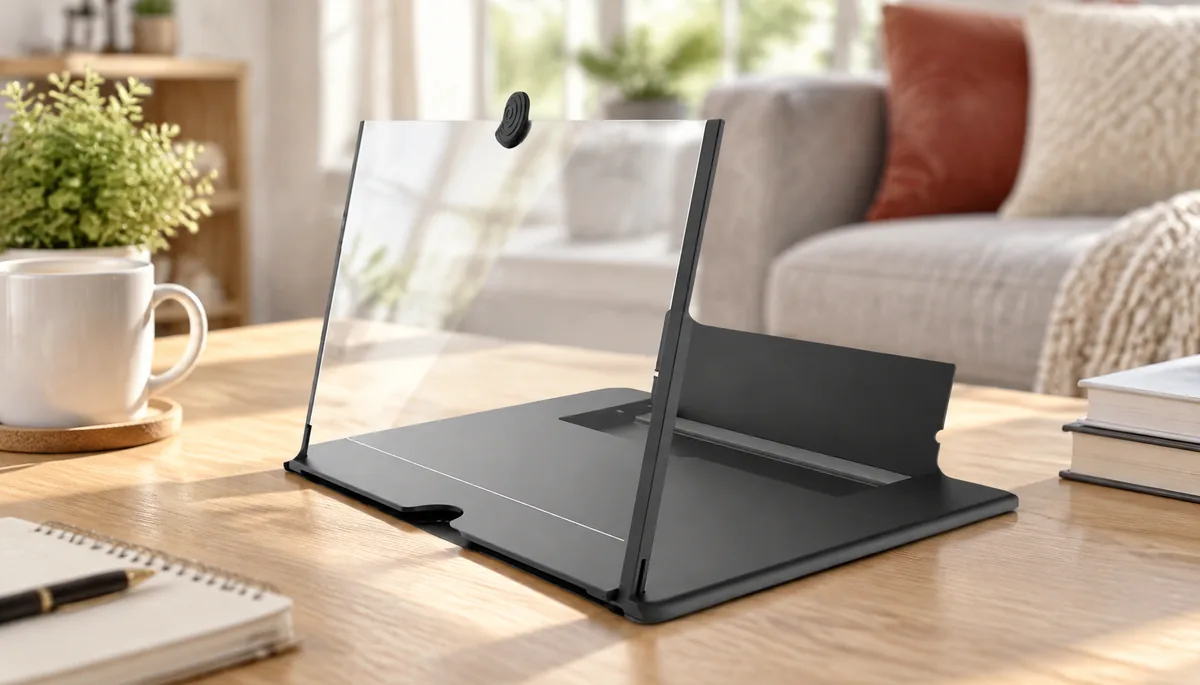
For budget-conscious desktop viewing, our featured recommendation is the Mobile phone desktop screen magnifier with integrated Bluetooth audio. Its seller-listed combination of optical enlargement, a folding stand, speaker, and ambient light makes it a focused option for a desk or bedside table. Commercial disclosure: Wawodiscount sells this product; this specification-based buying guide recommends it for that particular use, rather than claiming a market-wide testing victory. ([wawodiscount.com](https://www.wawodiscount.com/shop/mobile-phone-desktop-screen-amplifier-10-inch-large-screen-projection-pull-type-lazy-mobile-phone-bracket-watching-movie-artifact/))
Which Phone Screen Magnifier Should You Buy?
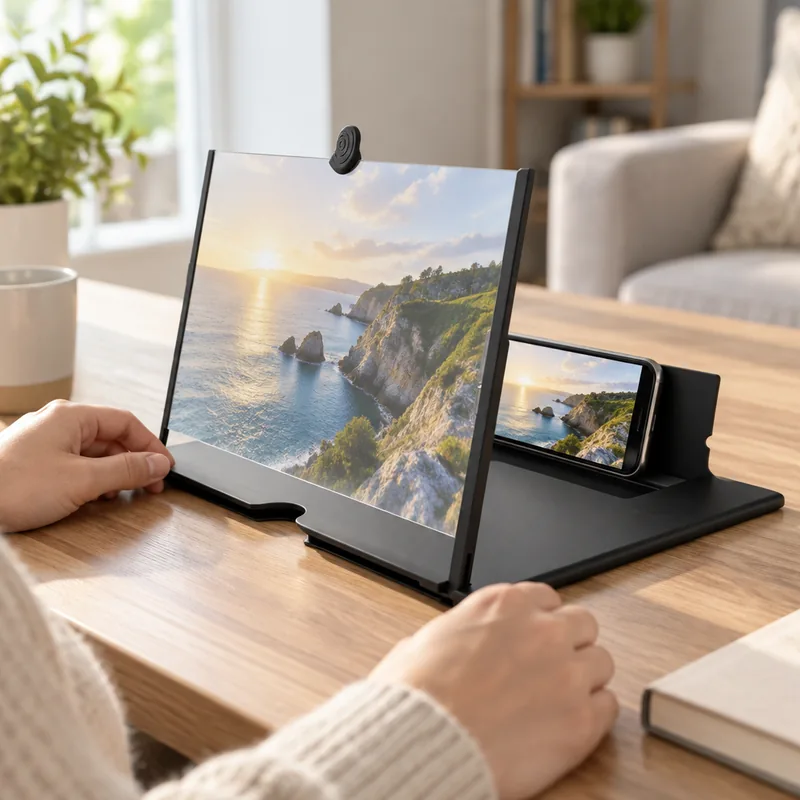
Choose an integrated magnifier for a dedicated movie-watching spot, a passive lens stand if you already own suitable audio, and a tablet if you need frequent touch interaction. Our budget recommendation is Wawodiscount’s 4-in-1 model: its seller-listed features combine a 10-inch / 25.4 cm optical format with desktop support and Bluetooth audio. ([wawodiscount.com](https://www.wawodiscount.com/shop/mobile-phone-desktop-screen-amplifier-10-inch-large-screen-projection-pull-type-lazy-mobile-phone-bracket-watching-movie-artifact/))
For a phone screen magnifier for watching movies, start with where you will sit. A fixed chair and tabletop make repeatable alignment easier. If storage matters, a foldable desktop phone screen magnifier lets you put the viewing setup away between sessions; compare the folded body and deployed base separately.
| Criterion | Our Value Pick | Premium Alternative |
|---|---|---|
| Product | Wawodiscount Mobile phone desktop screen magnifier | Sharper Image Smartphone TV Screen Magnifier |
| Optical format | 10 inches / 25.4 cm; seller-rated 2x–3x enlargement | 12 inches / 30.5 cm; curved magnifying screen |
| Speaker features | Integrated Bluetooth speaker; ambient light | Dual 5 W speakers; Bluetooth 5.0 |
| Phone fit | Adjustable phone holder; seller advertises iOS and Android compatibility | Stand accommodates most smartphones |
| Adjustment | Multi-angle folding support | Adjustable screen and phone alignment |
| Price | From $5.30; listing range $5.30–$6.89 | $79.99 displayed comparable value; $63.99 with advertised code 20RAKE |
| Return window | 30 days from delivery; unused condition and original packaging required | 60 days; new, unused condition with original packaging and accessories |
| Practical advantage | Low entry price combines optical viewing, phone support, and audio | Larger nominal format and documented speaker power |
Return conditions come from each store’s policy rather than an assumed home-trial entitlement. ([wawodiscount.com](https://www.wawodiscount.com/return-refund-policy/))
Our #1 Editor’s Recommendation: Wawodiscount’s 4-in-1 Model
Our first recommendation for a low-cost, single-viewer desktop setup is Wawodiscount’s Mobile phone desktop screen magnifier. The seller lists a 10-inch / 25.4 cm optical format, 2x–3x magnification, Bluetooth speaker, adjustable folding support, and ambient lighting. That combination suits shoppers who want one tabletop accessory instead of assembling several separate pieces. ([wawodiscount.com](https://www.wawodiscount.com/shop/mobile-phone-desktop-screen-amplifier-10-inch-large-screen-projection-pull-type-lazy-mobile-phone-bracket-watching-movie-artifact/))
phone screen magnifier with Bluetooth speaker
A phone screen magnifier with Bluetooth speaker combines two different jobs. The lens enlarges the apparent phone image optically, while Bluetooth routes the soundtrack to a speaker. Pairing handles sound; positioning handles the picture. Keeping those jobs distinct makes setup more straightforward. A magnifier forms an enlarged virtual image rather than projecting a movie onto your wall. ([edmundoptics.com](https://www.edmundoptics.com/knowledge-center/frequently-asked-questions/microscopy/magnifiers/how-do-i-calculate-the-power-of-a-magnifier/?utm_source=openai))

EDITOR’S VALUE PICK · DESKTOP VIEWING
Mobile phone desktop screen magnifier
From $5.30
Three reasons it fits a small entertainment station:
Enlarged viewing: 10-inch / 25.4 cm optical format with seller-rated 2x–3x magnification.
Integrated audio: Bluetooth speaker alongside the phone holder.
Space-saving storage: adjustable folding design for a shared desk.
Available in black, red, and white. Seller-listed features; current listing range $5.30–$6.89. ([wawodiscount.com](https://www.wawodiscount.com/shop/mobile-phone-desktop-screen-amplifier-10-inch-large-screen-projection-pull-type-lazy-mobile-phone-bracket-watching-movie-artifact/))
What We Love
One accessory combines the core pieces of a tabletop viewing station. The low starting price offers practical value for an occasional movie setup, while three color options suit a neutral desk or a brighter bedside arrangement.
Who it’s truly for: students, apartment dwellers, and casual viewers with a stable surface and a preferred seat.
Things to Consider
Choose this format for watching rather than constant tapping. A phone remains behind the lens, so interactive tasks call for a different arrangement.
Who should pass: shoppers seeking a touchscreen tablet replacement, wall projection, or a living-room display for several viewers.
What Should You Look for in a Phone Screen Magnifier?
Prioritize a readable central image, a holder that accommodates your phone and case, and support that maintains alignment. Then consider adjustment, folded storage, and audio setup. Lens size alone does not describe the useful viewing area: working distance and eye position also influence what you can comfortably see through a magnifier. ([edmundoptics.com](https://www.edmundoptics.com/knowledge-center/application-notes/microscopy/magnifying-lenses-how-to-choose-a-magnifier/))
- Lens clarity: compare fine text and straight lines at the center and near the edges.
- Usable viewing area: look for a complete frame with both subtitle lines visible.
- Phone-and-case fit: measure the cased phone’s width, thickness, and camera protrusion against the holder’s stated capacity.
- Stand stability: favor a base that supports the phone without rocking during ordinary operation.
- Adjustment range: position the image for your normal seat rather than leaning toward it.
- Folded footprint and build quality: assess hinge movement, lens protection, and the space needed in your drawer.
For powered audio, use the supplied instructions to identify the pairing procedure, charging input, compatible power supply, and control functions. Keep the packaging and included accessories together throughout setup. Those are practical habits, and they also preserve the materials required by Wawodiscount’s return policy. ([wawodiscount.com](https://www.wawodiscount.com/return-refund-policy/))
Is a 10-Inch Magnifier Better Than a Larger Model?
A 10-inch / 25.4 cm format is a sensible starting point for a compact viewing station, while a 12-inch / 30.5 cm or larger format deserves consideration when your surface and seating allow it. Bigger is not automatically clearer: useful magnification depends on lens design, working distance, and eye position. ([edmundoptics.com](https://www.edmundoptics.com/knowledge-center/application-notes/microscopy/magnifying-lenses-how-to-choose-a-magnifier/))
10 inch phone screen magnifier
A 10 inch phone screen magnifier describes the seller’s nominal optical format—not the width of its base or its folded storage dimensions. Wawodiscount’s model suits the compact-format shortlist; the Sharper Image alternative provides a documented 12-inch / 30.5 cm comparison. Its listed body dimensions are 10 × 8.1 × 1.9 inches / 25.4 × 20.6 × 4.8 cm. ([wawodiscount.com](https://www.wawodiscount.com/shop/mobile-phone-desktop-screen-amplifier-10-inch-large-screen-projection-pull-type-lazy-mobile-phone-bracket-watching-movie-artifact/))
10-Inch vs. 12-Inch Phone Screen Magnifiers: Which Fits Your Desk?
Measure the clear tabletop width and depth, then make a paper outline of the model’s published base dimensions. Include access to the phone and charging connection. Repeat with its folded dimensions for storage. For 14-inch / 35.6 cm and larger formats, use the same process instead of estimating the footprint from lens size.
Desk-fit rule: the better size is the one that leaves room for the whole setup without forcing an awkward posture. That is the ergonomic benefit worth pursuing. Use the desk-size guide alongside the practical setup checklist.
Should You Choose Built-In Speakers or Separate Audio?
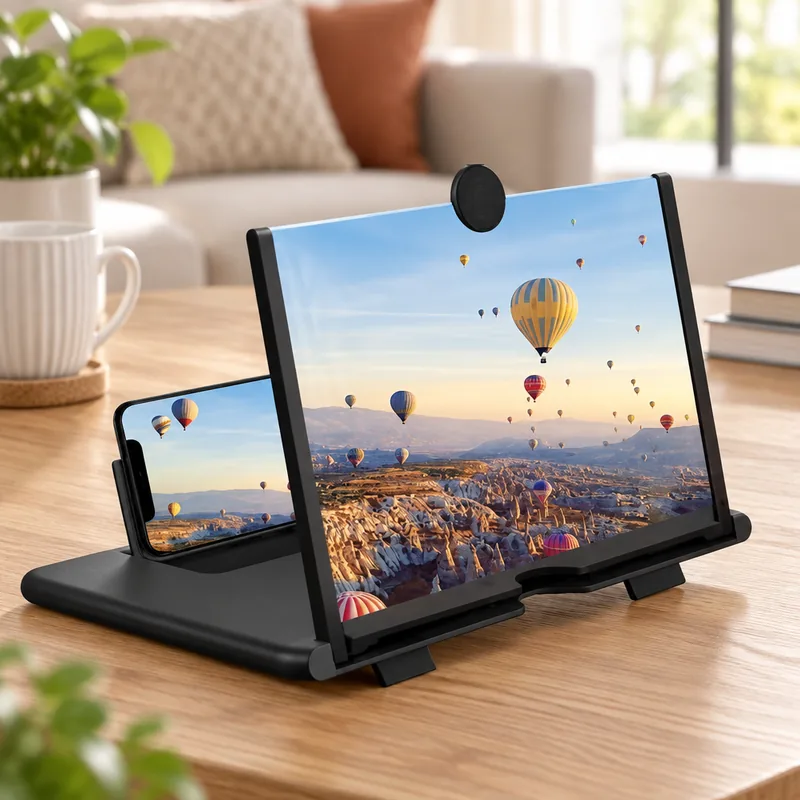
Choose integrated speakers when you want audio and phone support in one tabletop accessory. Choose a passive magnifier with separate audio when you already own a speaker or prefer headphones. Compare the complete basket, not just the lens price: additional hardware, shipping, and power accessories can change the value calculation.
Phone Screen Magnifiers With Speakers: What to Check Before Buying
| Setup | Total Cost | Desk Space | Setup Tasks |
|---|---|---|---|
| Featured integrated model | From $5.30, plus applicable delivery and tax | Speaker shares the stand assembly | Align phone and lens; pair Bluetooth; power audio according to instructions |
| Passive magnifier + owned speaker | Magnifier price and delivery; retain existing speaker | Separate position for the speaker | Align lens; pair and power the existing speaker |
| Passive magnifier + new speaker | Both purchase prices, delivery, and applicable power accessories | Two accessories to arrange | Set up magnifier and speaker independently |
| Passive magnifier + owned headphones | Magnifier price and delivery; retain existing headphones | No separate tabletop speaker | Connect headphones; align the phone behind the lens |
Named upgrade alternative: Sharper Image’s model documents dual 5 W speakers, Bluetooth 5.0, USB charging, and a 3–4 hour charging time. Its manual also explains onboard playback controls. Those are useful reasons to consider the higher-priced option when documented audio hardware matters more than the lowest entry cost. ([cdn4.sharperimage.com](https://cdn4.sharperimage.com/si/pdf/manuals/208256.pdf))
How Should You Evaluate Clarity, Stability, and Durability?
A useful hands-on evaluation keeps the phone, video, subtitles, lighting, and seating position identical across products. Record setup distances before judging the picture, then assess support movement and folding separately. Real-world testing should produce repeatable observations and original photographs; a durability benchmark is a test procedure, not a promise of lifespan.
Proposed evaluation protocol: use one downloaded clip containing dialogue, dark scenes, straight edges, and two-line subtitles. Record lens-to-phone and eye-to-lens distances in inches and centimeters. The following five dimensions define the assessment; they are measurement targets rather than product ratings.
| Dimension | Repeatable Procedure | Record |
|---|---|---|
| Image clarity | Pause the same subtitle frame at a fixed seat | Readable words at center and edges; original photographs |
| Viewing tolerance | Move sideways in 1-inch / 2.5 cm increments | Position where the full image stops being usable |
| Stand stability | Perform ten identical play/pause interactions | Base displacement in inches and millimeters; angle changes |
| Audio usability | Play the same dialogue clip from the same seat | Volume setting, intelligibility notes, and lip-sync observations |
| Folding durability | Complete 100 normal open/close cycles | Hinge play, holder alignment, and lens condition before and after |
Make the durability benchmark explicit: normal folding force, no forced hinge overtravel, and the same phone throughout. Record changes after 25, 50, and 100 cycles. Controlled alignment matters because changing phone angle, lens angle, or their separation can change the picture independently of build quality. ([cdn4.sharperimage.com](https://cdn4.sharperimage.com/si/pdf/manuals/208256.pdf))
Is a Phone Screen Magnifier Worth It Instead of a Tablet?
A magnifier makes sense when your phone already handles entertainment and you want an inexpensive optical viewing accessory. A tablet makes more sense when you want a separate touchscreen for browsing, reading, or frequent interaction. Optical enlargement changes the apparent image size; it does not add pixels to the phone’s source image. ([edmundoptics.com](https://www.edmundoptics.com/knowledge-center/frequently-asked-questions/microscopy/magnifiers/how-do-i-calculate-the-power-of-a-magnifier/?utm_source=openai))
phone screen magnifier vs tablet
The phone screen magnifier vs tablet decision is mostly about interaction. A lens sits in front of an existing display; a tablet supplies its own display and touch surface. Marketing language such as “HD” does not establish additional source detail. Magnification is an optical size relationship, not a resolution upgrade. ([edmundoptics.com](https://www.edmundoptics.com/knowledge-center/frequently-asked-questions/microscopy/magnifiers/how-do-i-calculate-the-power-of-a-magnifier/?utm_source=openai))
| Option | Best Use | Purchase Cost | Interaction | Setup |
|---|---|---|---|---|
| Phone magnifier | Seated viewing from an existing phone | Featured model from $5.30, plus applicable delivery and tax | Phone controls remain behind the lens | Align phone, lens, and seat; arrange audio |
| Ordinary phone stand | Calls and frequent tapping at the original screen size | No additional purchase if you already own one | Direct access to phone screen | Place phone and set angle |
| Tablet | Interactive apps on a separate display | Device price, plus any case, stand, and delivery | Direct touch on the larger device | Charge, sign in, and install apps |
Practical Magnifier Setup: Start With Alignment
- Place the accessory on a level surface and center the phone behind the lens.
- Start playback before settling into your usual seat.
- Adjust phone angle, lens angle, and separation in small steps; change one variable at a time.
- Move lamps away from distracting reflections, then set audio to a comfortable level.
The first three steps follow the same alignment principles described in Sharper Image’s operating manual. Treat that as a useful optical setup approach, while using your chosen model’s instructions for its own controls. ([cdn4.sharperimage.com](https://cdn4.sharperimage.com/si/pdf/manuals/208256.pdf))
What Makes a Good Black Friday or Holiday Buy in 2026?
A good holiday buy combines a suitable viewing format with a worthwhile delivered price and return conditions that fit the purchase. Black Friday falls on November 27, 2026, followed by Cyber Monday on November 30. Save a dated price reference now, then compare the same variant and basket when offers appear. ([timeanddate.com](https://www.timeanddate.com/holidays/us/cyber-monday?utm_source=openai))
For Black Friday phone screen magnifier deals 2026, use the observed $5.30–$6.89 product range as a dated reference—not a promised holiday discount. Record shipping and tax separately. Wawodiscount’s published contiguous-U.S. policy lists $5 standard shipping for orders under $30, making a $5.30 single-item order $10.30 before tax under those terms. ([wawodiscount.com](https://www.wawodiscount.com/shop/mobile-phone-desktop-screen-amplifier-10-inch-large-screen-projection-pull-type-lazy-mobile-phone-bracket-watching-movie-artifact/))
For European and other international destinations, compare the destination-specific checkout total in your payment currency, including any displayed import charges. A percentage discount is useful only when the complete basket represents better value. Keep your dated reference alongside the published shipping policy and return and refund policy.
Holiday Phone-Accessory Gift Guide: Four Fit Questions
- Phone: does the recipient’s cased device suit the holder?
- Space: is there a stable desk or bedside surface near the preferred seat?
- Audio: would they use integrated sound, or do they prefer headphones?
- Habit: do they enjoy seated viewing, rather than continuously handling the phone?
Buying verdict: choose the featured 4-in-1 model for a budget tabletop station built around an existing phone. Choose a basic stand for frequent interaction, or a tablet for a separate touchscreen. Our recommendation rests on buyer fit, the seller-listed feature combination, and the low starting price—not invented performance scores.
Can you read subtitles through a phone screen magnifier?
Subtitles are enlarged along with the phone image. Readability depends on the original text, alignment, lighting, and usable field of view. Use a paused two-line subtitle frame to adjust the setup, and increase subtitle size in the app when that option is available. ([edmundoptics.com](https://www.edmundoptics.com/knowledge-center/application-notes/microscopy/magnifying-lenses-how-to-choose-a-magnifier/))
Where should you sit for the clearest picture?
Start centered in front of the lens, then adjust the phone, lens angle, and their separation until the whole frame is visible. Keep that position consistent when comparing models. The operating manual for Sharper Image’s magnifier recommends those three adjustments to improve the picture. ([cdn4.sharperimage.com](https://cdn4.sharperimage.com/si/pdf/manuals/208256.pdf))
How should you handle glare?
Try moving the setup or nearby lamp so a bright reflection no longer sits over the picture. Reassess the image from your normal seat after each change. Lens coatings can influence reflected light, so evaluate the actual arrangement rather than assuming every magnifier behaves identically. ([edmundoptics.com](https://www.edmundoptics.com/knowledge-center/application-notes/microscopy/magnifying-lenses-how-to-choose-a-magnifier/))
Can you control the phone through the magnifying lens?
The lens is an optical viewing surface, not an added touchscreen. Use the phone itself for app controls. For repeated browsing, typing, or gaming inputs, an ordinary stand or tablet offers a more direct interaction layout. ([edmundoptics.com](https://www.edmundoptics.com/knowledge-center/frequently-asked-questions/microscopy/magnifiers/how-do-i-calculate-the-power-of-a-magnifier/?utm_source=openai))
📚 Related Recommended Guides (Topic Cluster):
- Best Skirted Jig Lures for Bass and Catfish — In-depth testing insights & buyer benchmarks.
- Best Shipping Thermal Labels for Small Businesses — In-depth testing insights & buyer benchmarks.


